

How to Set Weekend and Holiday Pricing
Learn how to update weekend and holiday pricing for your property using the Bulk Update feature in the Host Control Centre. This guide shows you how to apply pricing changes across a selected date range in just a few steps.
On this page
How to Set Weekend and Holiday Pricing
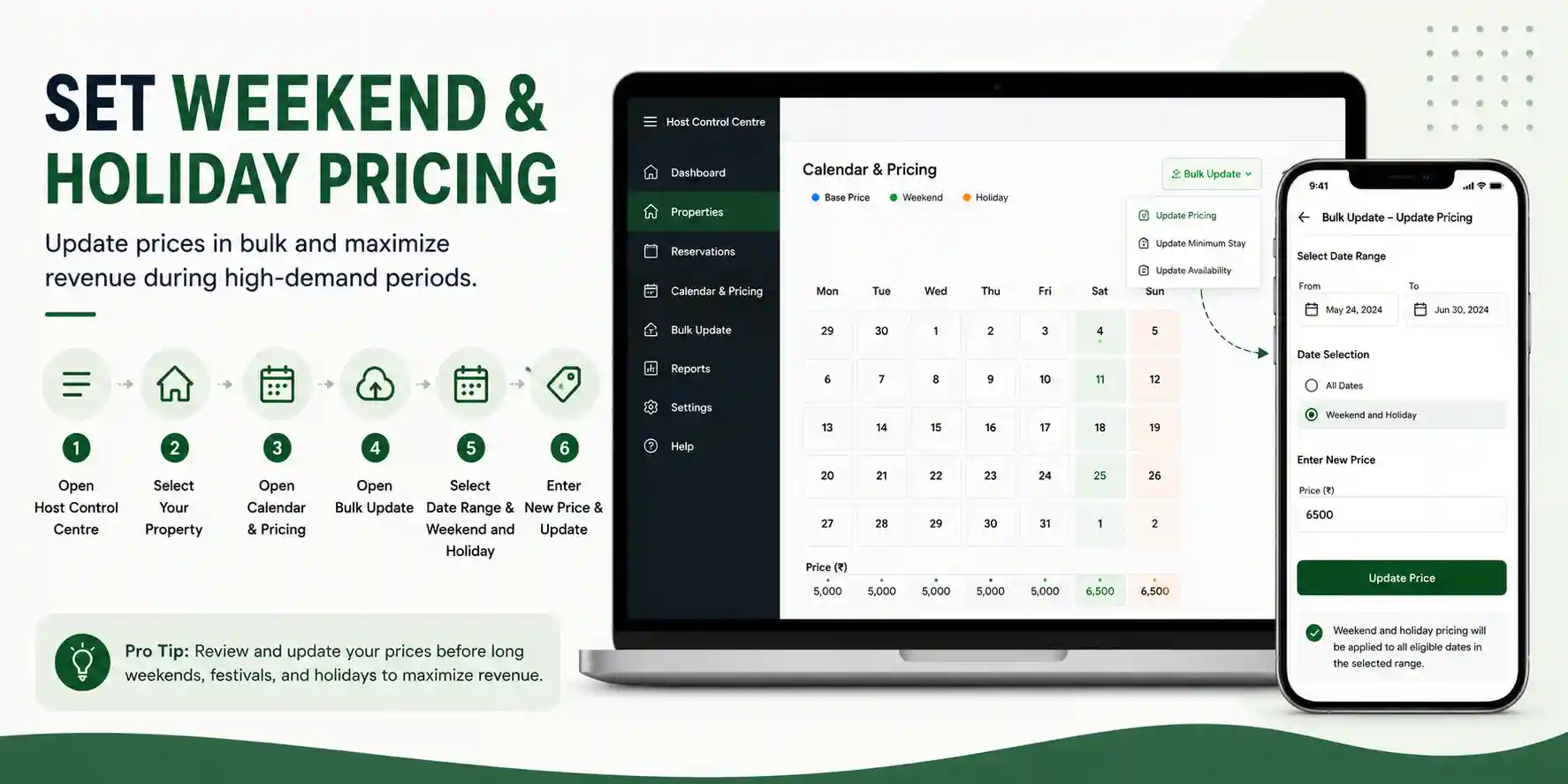
Weekend and holiday pricing allows you to charge higher rates during periods of increased demand. Using the Bulk Update feature in the Host Control Centre, you can update pricing for multiple dates at once instead of editing each day individually.
Before You Begin
Make sure you are logged in to your Homeyhuts account and have access to the property you want to update.
How to Update Weekend and Holiday Pricing
Step 1: Open the Host Control Centre
- Log in to your Homeyhuts account.
- Click the three-line menu in the top-right corner.
- Select Host Control Centre.
Step 2: Select Your Property
- Navigate to Properties.
- Choose the property you want to update.
Step 3: Open Calendar & Pricing
- Click Calendar & Pricing for the selected property.
Step 4: Open Bulk Update
- Click Bulk Update in the top-right corner.
- Select Update Pricing.
Step 5: Select the Date Range
- Choose the From and To dates.
- Under the date selection options, choose Weekend and Holiday.
Step 6: Enter the New Price
- Enter the price you want to apply.
- Click Update Price to save your changes.
Your weekend and holiday pricing will now be applied to all eligible dates within the selected date range.
Why Use Weekend and Holiday Pricing?
Updating your pricing for weekends and holidays helps you:
- Increase revenue during high-demand periods.
- Apply pricing changes to multiple dates at once.
- Save time by avoiding manual updates.
- Keep your pricing consistent across selected dates.
Pro Tip
Review your pricing regularly before long weekends, festivals, and holiday seasons. Updating your rates in advance helps you maximize revenue while keeping your calendar ready for increased booking demand.